Items
GetItems: Synchronize Products
The getItems method sends back all the products referenced in the inventory. Note that the getItems response is in several parts. The number of products sent back is limited to 200 each time, so you have to do several getItems requests to receive your full inventory.
Entry parameters
Field | Type/Size | Remarks |
|---|---|---|
PageNumber | Integer | Result page number |
DateModificationFrom | DateTime | Sends back only the products updated after this date |
SKU | String | Sends back only the products matching with this SKU |
Results of the method
Field | Type/Size | Remarks |
|---|---|---|
nb_pages integer | Integer | Total number of pages (parts) |
nb_items integer | Integer | Number of Products |
cur_page intege | Integer | Current page |
Items | tns:ArrayOfInventoryItem | Results tables (product information) |
PostItems: Inventory Import
Synchronising your inventory with Neteven is done through the postItems method, which can either be used to create or to update a product.
Synchronisation is based on the Stock Keeping Unit (SKU) of a product.
PostItems request has to include a list of items elements that conform with the InventoryItem type described in the WSDL.
The number of fields characterising an InventoryItem element type allow you to make a very detailed indexation of your products.
Please note that apart from the SKU no field is mandatory to send a request, therefore you can regularly send simple updates such as SKU and quantity.
Some information can be sent in several languages:
- Title
- Subtitle
- Description
- Remark (Commentaire)
- Specific fields (Champs spécifiques)
To provide the langage of one of these fields, you must specify the value of the language_id attribute in the matching tag. Example :
…
<ns1:Title language_id=”en”>Needle</ns1:Title>
<ns1:Title language_id=”fr”>Aiguille</ns1:Title>
…
With regard to specific fields, the ArrayOfSpecificFields parameter allows you to send this information for each of your products. Example :
<ns1:SpecificField>
            \<ns1\:Name>couleur\</ns1\:Name>
            \<ns1\:Value>yellow\</ns1\:Value>
</ns1:SpecificField>
Also, some information is available according to the currency:
- Prix Fixe (Fixed price)
- Prix de depart (Starting price)
- Prix de reserve (Reserve price)
All price information is now available in several currencies.
A postItems request can include different product categories (specific fields of each category will be taken into account).
Note: in a single request, an item must only be returned once.
‘1.4 additions part 1’ start here
With regard to additional images and other medias, the ArrayOfMedias parameter allows you to send this information for each of your products.
Media type: Image (Currently only images are available as media type)
- (image1 ~ image50)
Example :
<ns1:Media>
        \<ns1\:Name type = “image”>image1\</ns1\:Name>

        \<ns1\:Value>www\.image.com\</ns1\:Value>
</ns1:Media>
‘1.4 additions part 1’ end here
‘1.4 additions part 2’ start here
With regard to price fields, the ArrayOfPrices parameter allows you to send this information for each of your products.
- price_fixed
- price_starting
- price_reserved
- price_retail
- price_second_chance
- price_best_offer
- price_additional_1 ~ price_additional_250
- price_shipping_local_1 ~ price_shipping_local_20
- price_shipping_int_1 ~ price_shipping_int_20
- price_shipping_supp_local_1 ~ price_shipping_supp_local_20
- price_shipping_supp_int_1 ~ price_shipping_supp_int_20
Example :
<ns1:Price>
        \<ns1\:Name currency\_id = “EUR”>price\_fixed\</ns1\:Name>
        \<ns1\:Value>10.99\</ns1\:Value>
</ns1:Price>
‘1.4 additions part 2’ end here.
Entry parameters
Field | Type | Remarks |
|---|---|---|
Items | ArrayOfInventoryItem | InventoryItem array |
Description of InventoryItem type data
Field | Type/Size | Remarks |
|---|---|---|
Title | string[255]
| Product title |
SubTitle | string[255]
| Subtitle |
Description | Text | Product description |
Comment | Comment | Remarks, if any |
SKU | string[50]
| Stock Keeping Unit – product ID |
SKUFamily | String[50]
| Family Stock Keeping Unit – Family identifier |
Brand | String | Product brand |
EAN | String | EAN code |
UPC | String | UPC code |
ISBN | String | ISBN code |
ASIN | String | ASIN code |
PartNumber | String | Other product Code (apart from EAN,ISBN,ASIN) |
Quantity | Integer | Available quantity in stockCan be updated by the merchant |
QuantityAvailable | Integer | Available quantity, calculated from Neteven by a substraction between
the quantity from the merchant and the stock reserved by unshipped
orders.Can’t be updated by the merchant |
QuantityReserved | Integer | Reserved quantity calculated from Neteven by the stock from the merchant and the total stock from unshipped orders in NetevenCan’t be updated by the merchant |
Cost | Price | Buying Price |
Tva | Double | Cost of Vat including ecotax |
Ecotaxe | Double | Amount of ecotax including tax as it’s considered as a merchant service |
PriceFixed | Price | Fixed Price |
PriceStarting | Price | (ebay) Starting price for bid listings |
PriceReserved | Price | (ebay) Reserve Price |
PriceRetail | Price | Retail Price |
PriceSecondChance | Price | (ebay) Second Chance Price (not used) |
PriceBestOffer | Price | Best Offer Price (not used) |
PriceAdditional1 to 15 | Price | Additional field allowing merchants to specify special selling prices for definite periods (fall, winter (…) sales, …) |
Etat | Enum (integer) | 0: Not specified1: Used –Like new2: Used – Very good condition3: Used – Good condition4: Used – Correct condition5: Collector – Like New6: Collector – Very good condition7: Collector – Good condition8: Collector – Correct condition9: Refurbished by the Seller10: Refurbished by the Manufacturer11: New (with tag/packaging)12: New (without tag/packaging)13: New with flaws15: For spare parts/out of order16: Refurbished – Like new17: Refurbished – very good condition18: Refurbished – good condition19: Recondionated – correct state |
LotSize | integer | If a lot: number of products |
Classification | String | Product categorization, for example :Movies/DVD |
Weight | Double | |
Height | Double | ** ** |
Width | Double | ** ** |
Depth | Double | ** ** |
PriceShippingLocal1 à 3 | Price | Shipping costs (local) |
PriceShippingSuppLocal1 à 3 | Price | Additional shipping costs (local) |
PriceShippingInt1 à 3 | Price | Shipping costs (international) |
PriceShippingSuppInt1 à 3 | Price | Additional shipping costs (international) |
ShippingDelay | Integer | Shipping delay |
Image1 to Image16 | string[255]
| Product photo URL |
WarehouseId | Double | Warehouse ID (reading only) |
WarehouseStock | Double | Warehouse available stock (reading only) |
WarehouseShipped | Double | Stock waiting to be received by external warehouse (FBA) |
ArrayOfSpecificFields | ArrayOfSpecificFields | List of Specific Fields (see WSDL) |
ArrayOfMedias | ArrayOfMedias | List of Medias (see WSDL) |
ArrayOfPrices | ArrayOfPrices | List of Prices (see WSDL) |
Results of the method
Field | Type/Size | Remarks |
|---|---|---|
nb_pages integer | Integer | Total number of pages (parts) |
nb_items integer | Integer | Number of Products |
cur_page intege | Integer | Current page |
Items | tns:ArrayOfInventoryItem | List of elements InventoryItem |
Extract of a PHP5 script: Execution of a postItems request or the creation of two products with specific fields
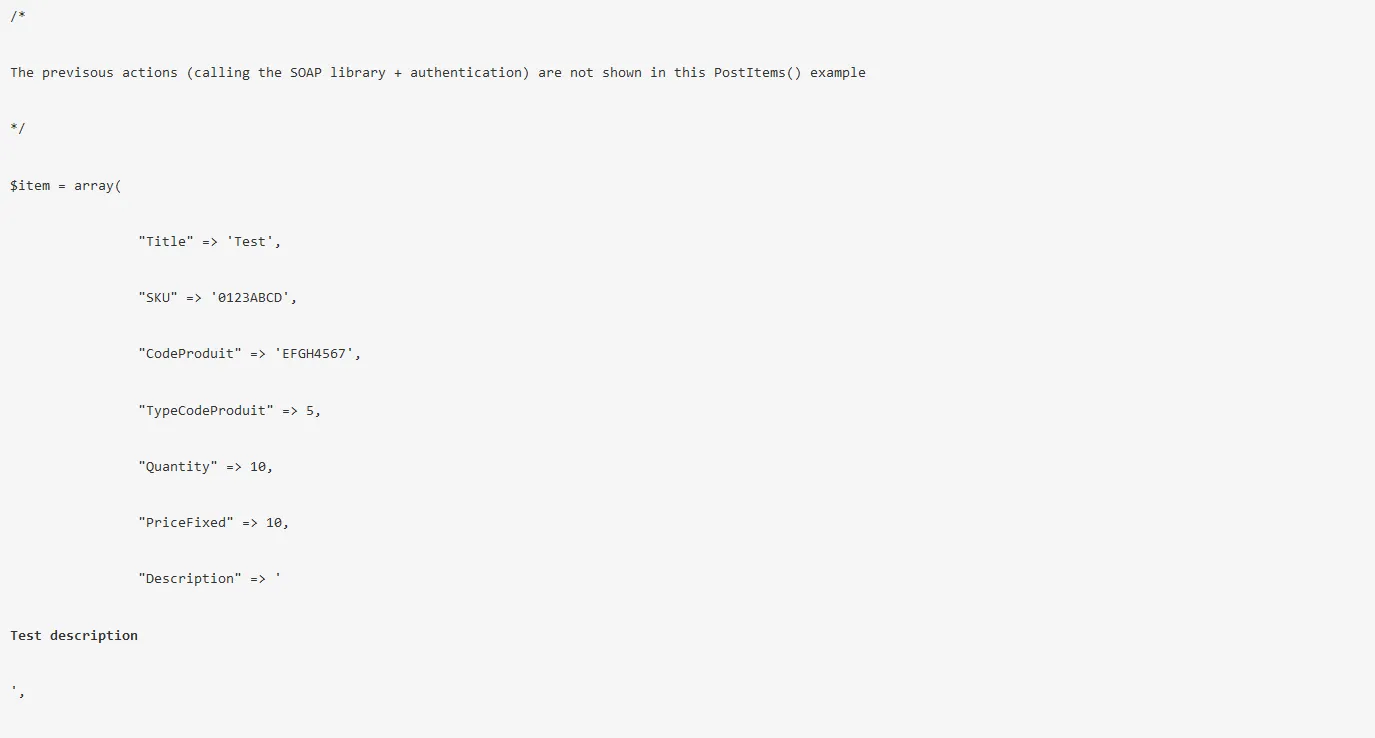
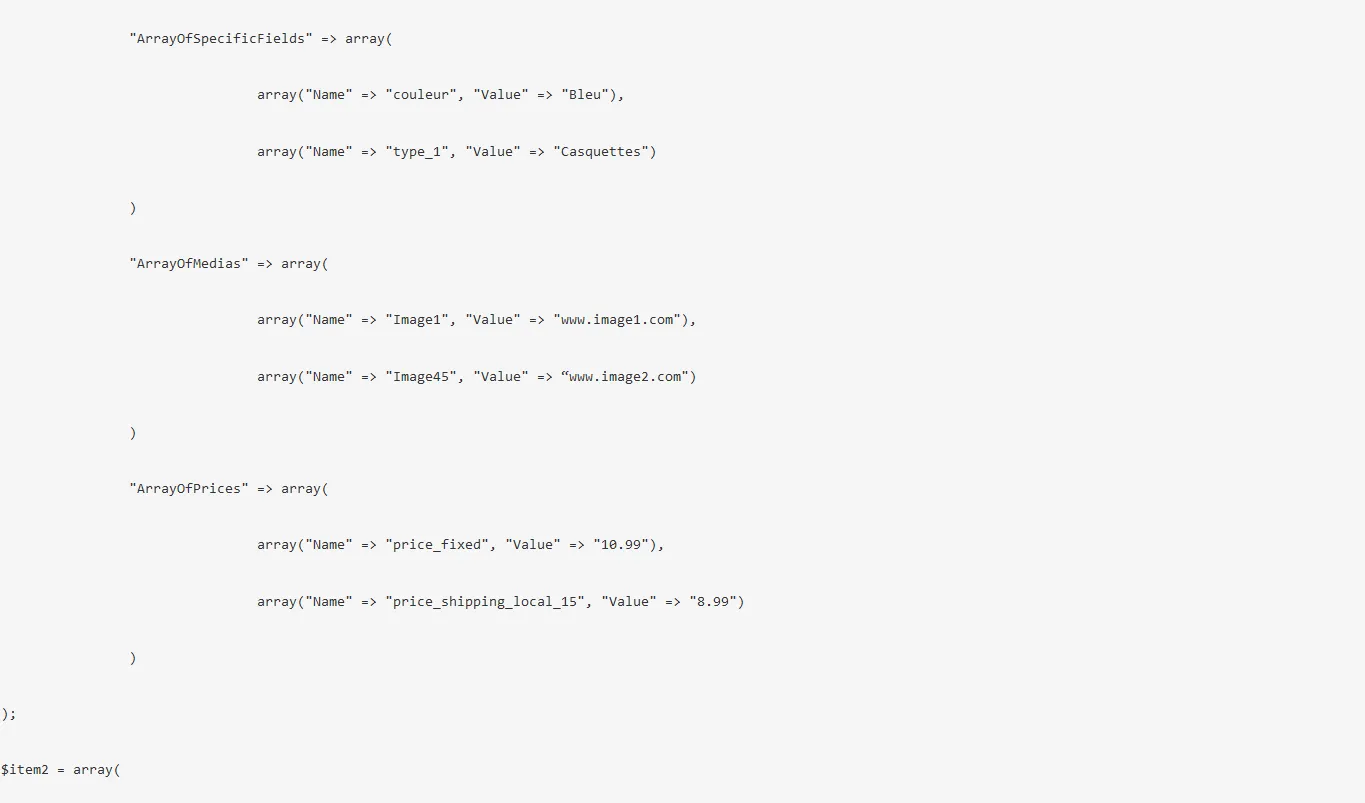
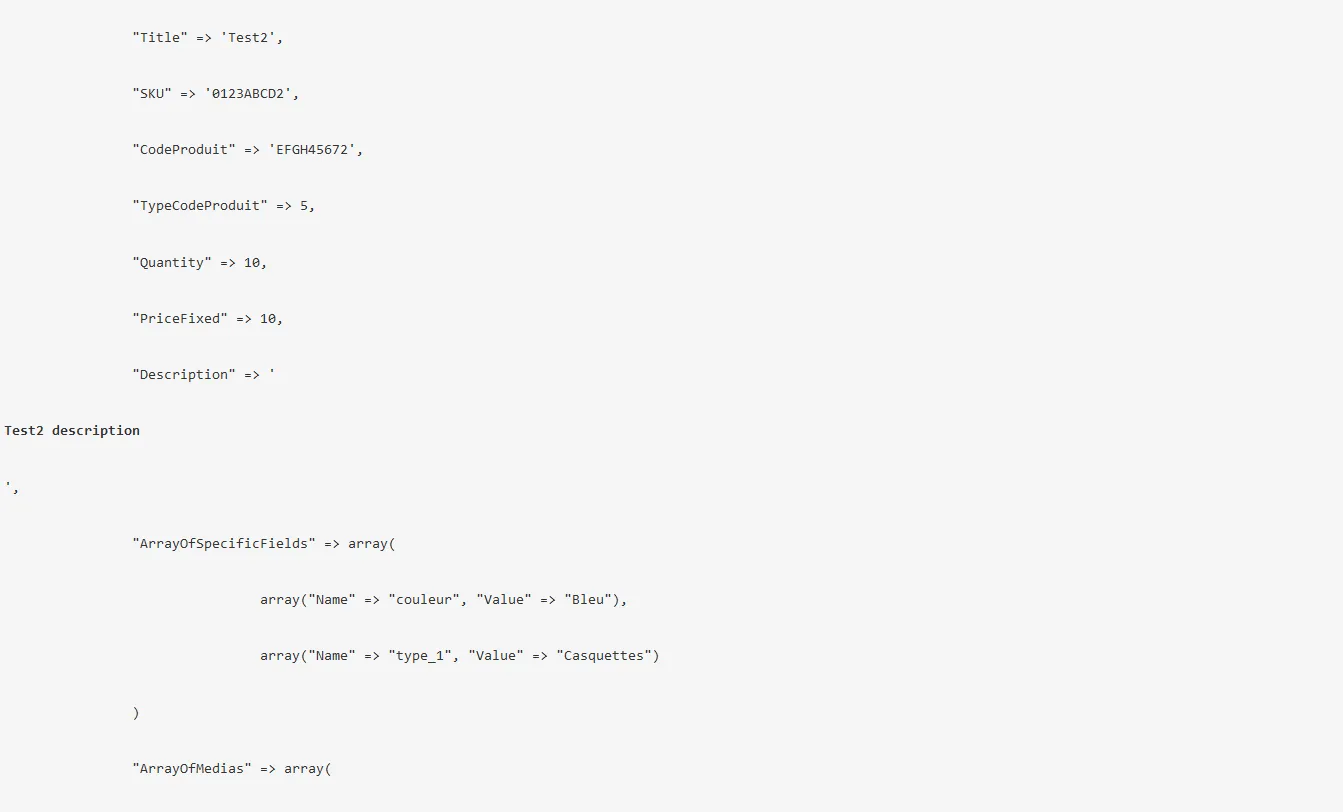
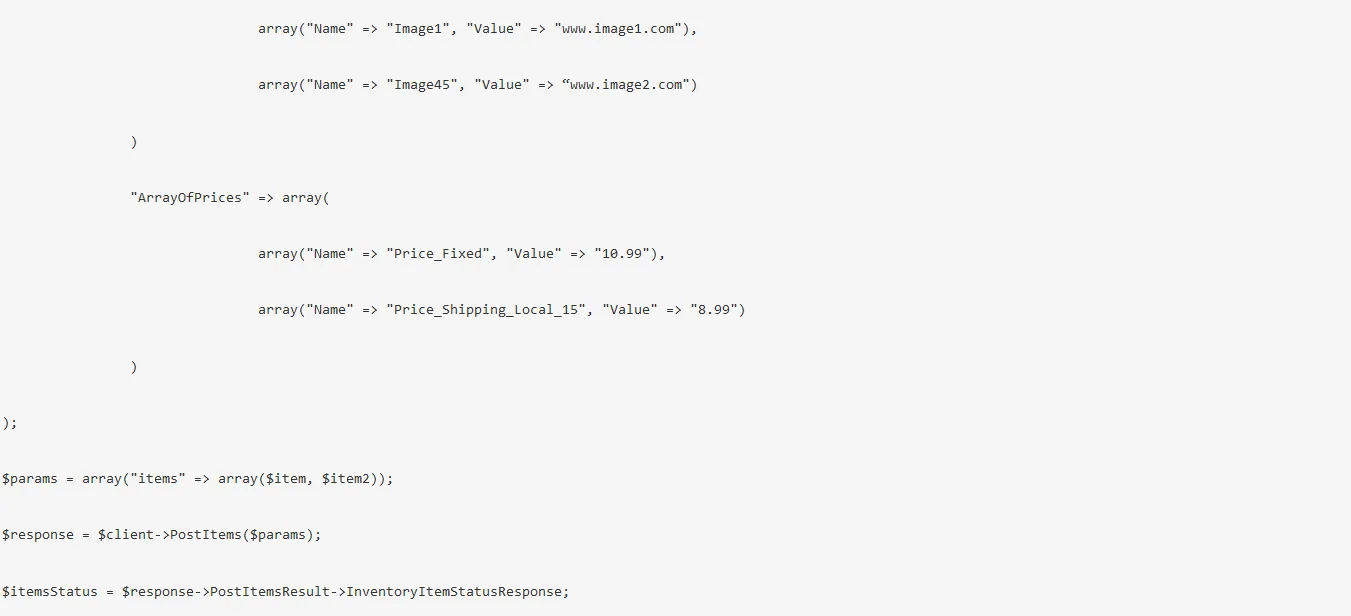
Apart from the InventoryItemStatusResponse value, a postItems response encloses a summary table for each product with the errors encountered during the upload, if any (in general, a missing mandatory value).
Please note that for large uploads we recommend you separate the postItems request into several parts.